Home | Features | The App | FAQ & Tools
Batch-processing | Contact us

Free up gigabytes of phone storage and keep more photos and videos with you
Reduce the size of your photos and videos to optimize your phone storage and free up space for more memories. Handle your files locally on your Windows PC without cloud services or monthly fees.
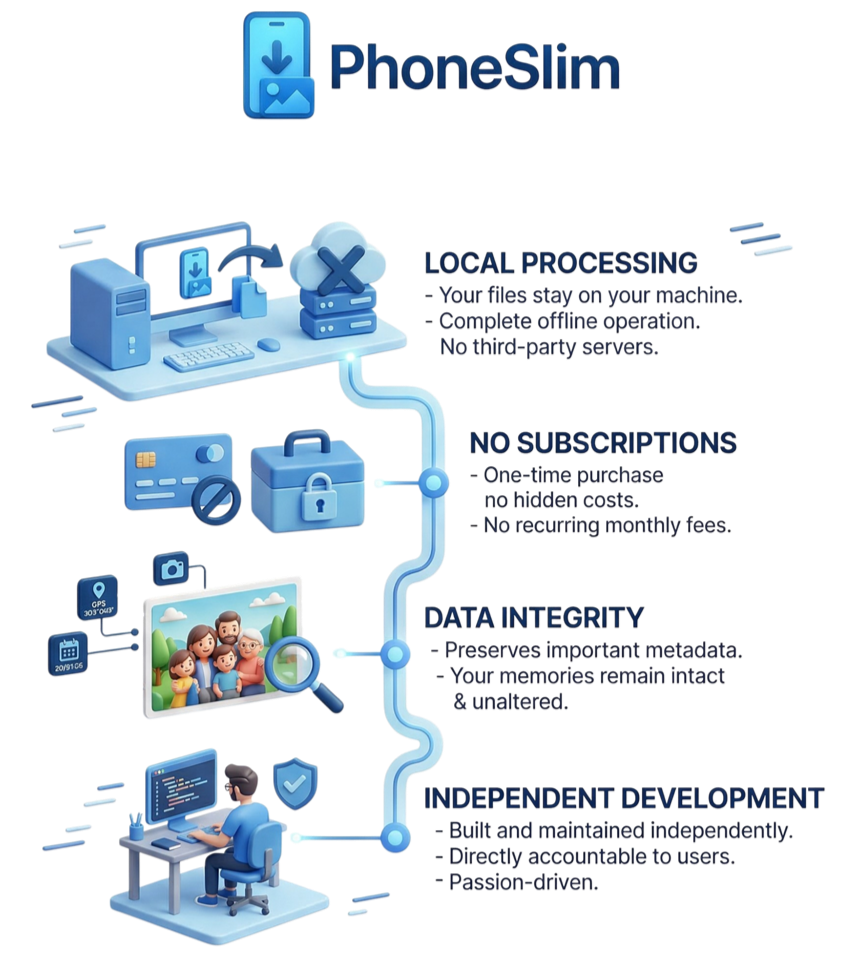
Works entirely on your PC - your files never leave your devices
Simple and clear interface - you don't have to be a tech expert
No cloud services, no subscriptions

Is your phone feeling full?
PhoneSlim is here! Grab the full version free for a limited time.
how phoneslim works
Optimize your phone storage in
3 Simple Steps

STEP 1
Copy your photos and videos to your Windows PC.
We recommend keeping your original files safely stored on your PC or other device as a high-quality backup.

STEP 2
Download and run PhoneSlim on your Windows PC. It's simple to use.

STEP 3
Replace the original photos and videos on your phone with the slimmed-down versions and enjoy your newly freed storage.
in a nutshell
See how PhoneSlim works

is phoneslim right for you?
Do you want to keep more photos and videos stored directly on your phone?
Free up phone storage and get rid of cloud fees
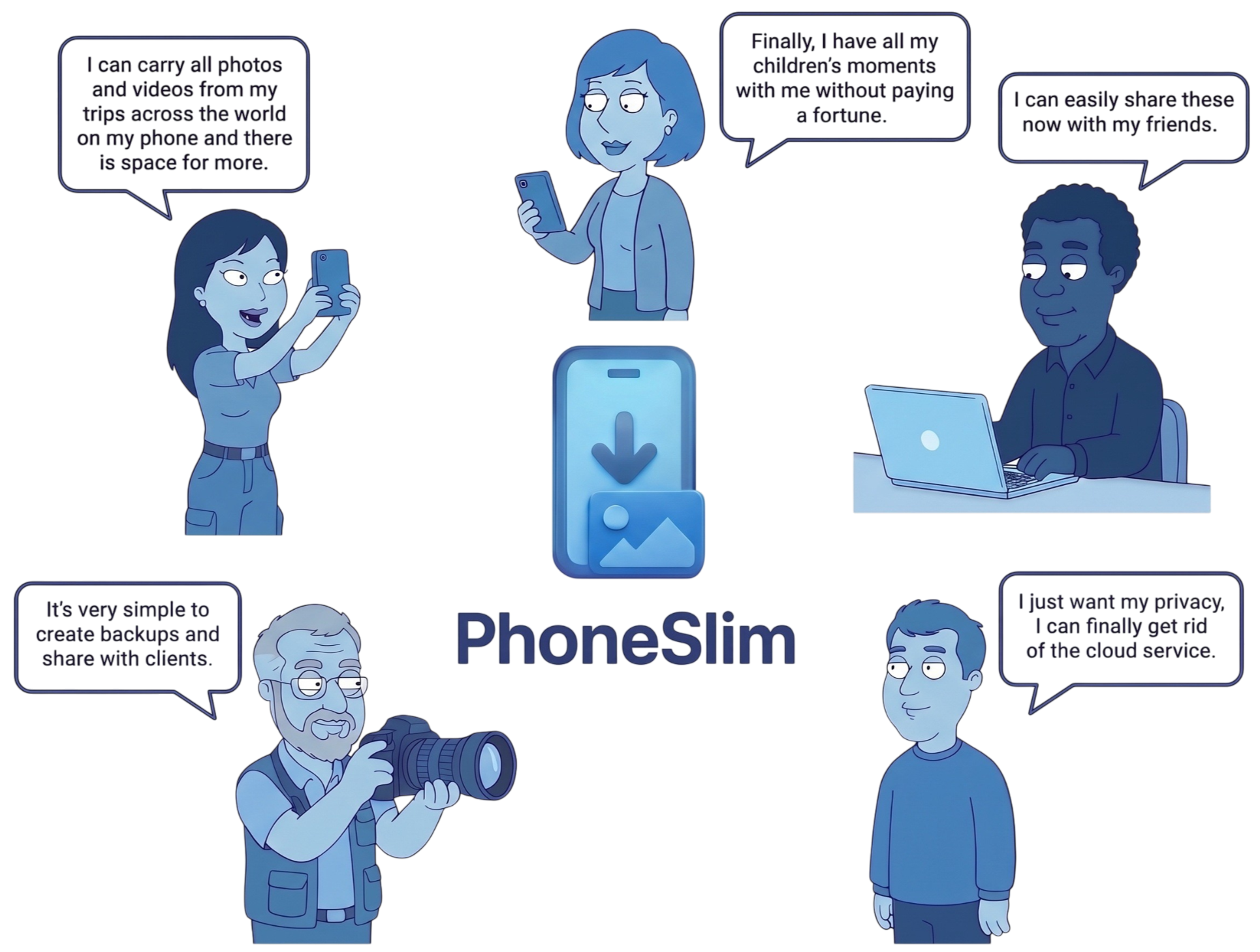

Save storage on your phone without burning your budget
Stop the "Storage Full" pop-ups on your phone. Avoid the cost of expensive phone upgrades or monthly cloud subscriptions.
Modern smartphones record at very high quality to ensure the footage can be edited, zoomed, or color-corrected later. For simple viewing on your phone, this quality is often much higher than you need. PhoneSlim lets you select the exact quality that matches your needs to save massive amounts of storage.
We respect your privacy: your files are for your eyes only
Keep your photos and videos safely on your personal devices. No cloud service is required, and PhoneSlim never accesses or uploads your personal files.
Make your photos and videos compatible and correctly displayed on your phone
PhoneSlim automatically converts older photo and video formats into modern, universally compatible types so you can easily enjoy them on your phone. During processing, file creation dates and GPS location data are carefully preserved and corrected, ensuring all your memories are displayed in the exact right order in your phone's gallery. Learn more about how PhoneSlim can improve your phone gallery here.
Why you Can Trust PhoneSlim
our phoneslim versions
Download PhoneSlim
Download the PhoneSlim app first and then get a license to unlock the FULL version
Download
PhoneSlim for Windows
Free
Download PhoneSlim v1 and start optimizing your media files. Process folders of up to 3GB at a time.
Click here if you experience problems with your downloador download from
Get a license for
PhoneSlim Full
$28.99
Free
Use discount code EARLYV1FULL at checkout to unlock PhoneSlim v1 FULL and process your files with no size limits.
Limited time offer!
Learn more about how PhoneSlim can improve your phone gallery
PhoneSlim can help you make your photos and videos compatible and correctly displayed on your phone
Privacy Policy | Terms & Conditions | EULA
Refund Policy
© PhoneSlim Ltd. All rights reserved.
Home | Features | The App | FAQ & Tools
Batch-processing | Contact us

Improve your phone gallery
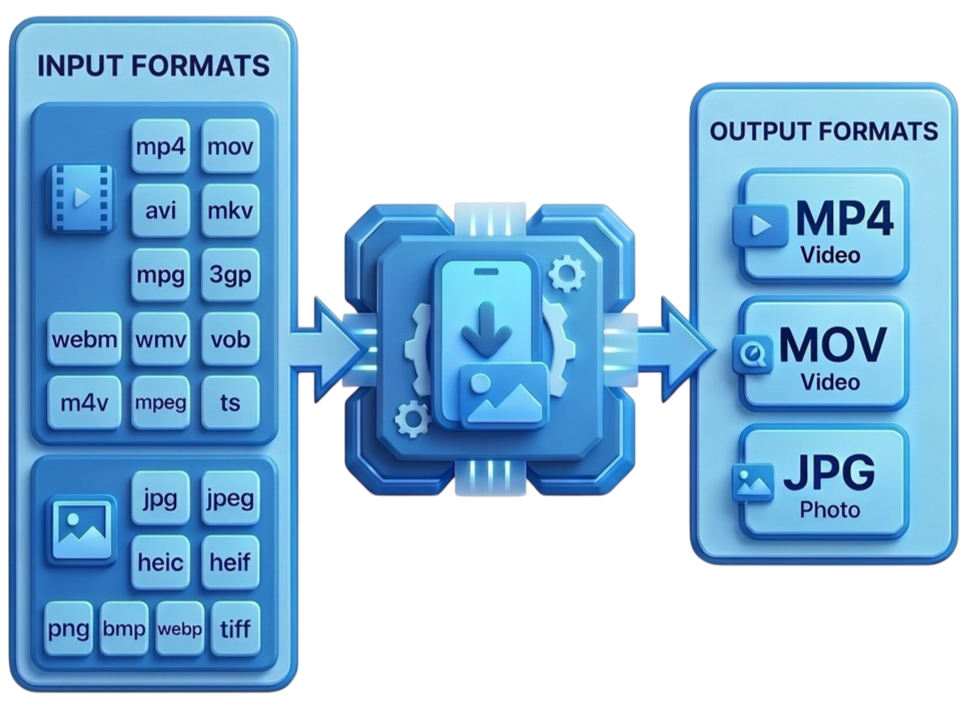
Enjoy old videos from your digital camera on your modern phone
Video and image formats that were common a few years ago are often unreadable on modern smartphones. PhoneSlim automatically converts older AVI, MKV, MPG, 3GP, WebM, WMV, M4V, VOB, MPEG, and TS video files into modern MP4 or MOV formats so you can finally watch them on your phone. It will also automatically convert PNG, BMP, WebP, and TIFF image files into the universally supported JPG format.
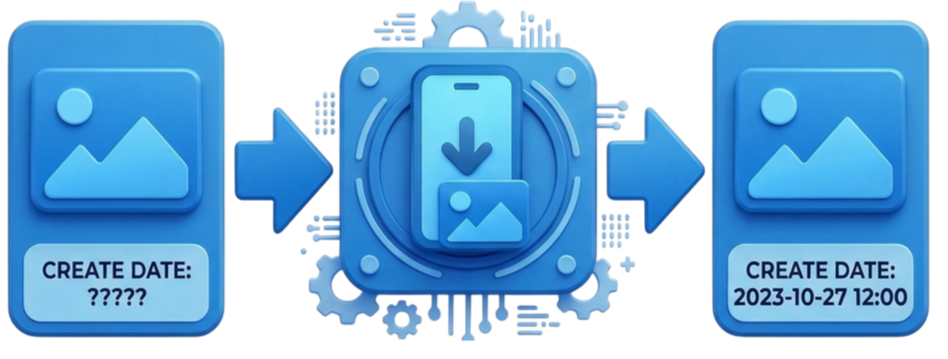
Make sure your photos and videos appear in the correct order
Photos and videos downloaded or shared through social media are usually stripped of their "Create Date" metadata. This is the exact data most smartphones rely on to display your files in chronological order. PhoneSlim automatically extracts and adds the missing metadata during processing, ensuring your memories are finally displayed correctly in your phone's gallery.
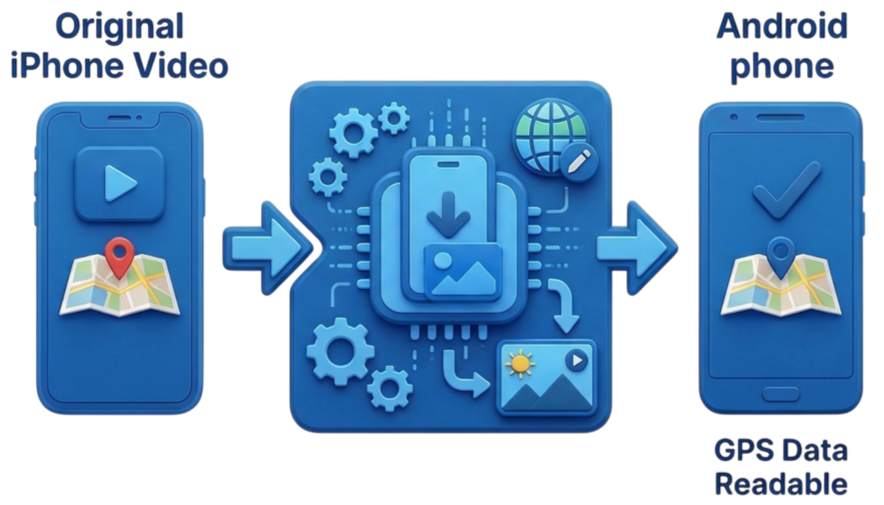
Make your video GPS data readable across more devices
Android devices (like Samsung, Pixel, or Xiaomi phones) read video GPS metadata differently than iPhones. If you have ever switched from an iPhone to an Android device, you may have noticed that your video files suddenly lost their location data. When processing a video file, PhoneSlim duplicates and formats the GPS metadata so it can be easily read by both iPhone and Android devices.
Note: Because metadata reading can still be temperamental depending on your specific device's gallery app, we recommend trying the Free version of PhoneSlim first to ensure the converted files work perfectly for you.
Learn more about PhoneSlim for Windows
PhoneSlim is a desktop application designed for Windows 10 and Windows 11 that can batch-process photos and videos across multiple folders at once. The interface is simple and clear - you don't have to be a tech expert to use it.
Privacy Policy | Terms & Conditions | EULA
Refund Policy
© PhoneSlim Ltd. All rights reserved.
Home | Features | The App | FAQ & Tools
Batch-processing | Contact us

PhoneSlim for Windows
This is how PhoneSlim will look on your Windows PC
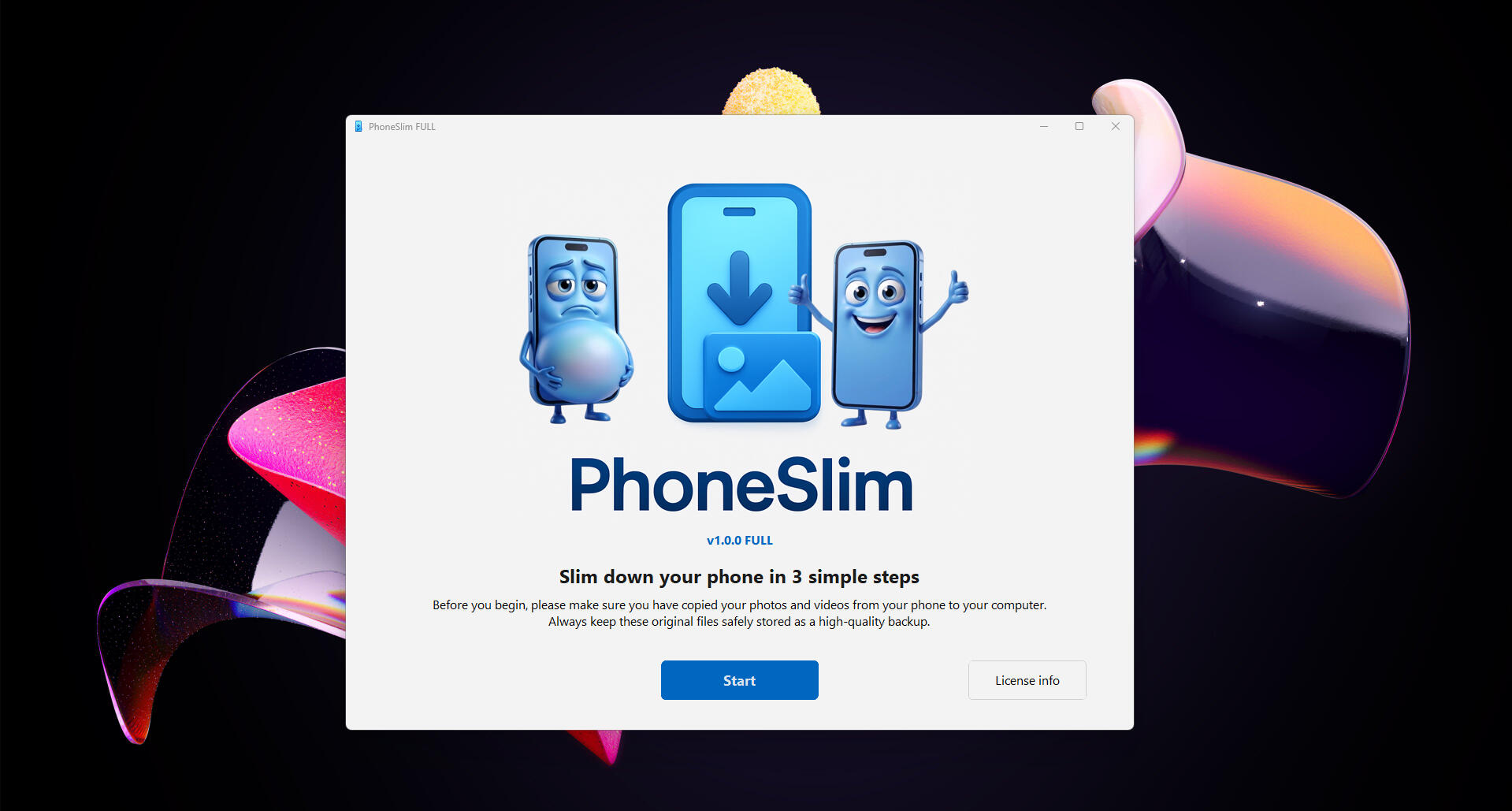
The Welcome Screen
The Welcome screen is the first window you will see when you run PhoneSlim on a Windows PC.
PhoneSlim is a Windows utility-style app, guiding you step-by-step through a series of pop-up windows.
Make sure you have copied all the photos and videos you want to process to your Windows PC (or any connected external drive) before you click Start.
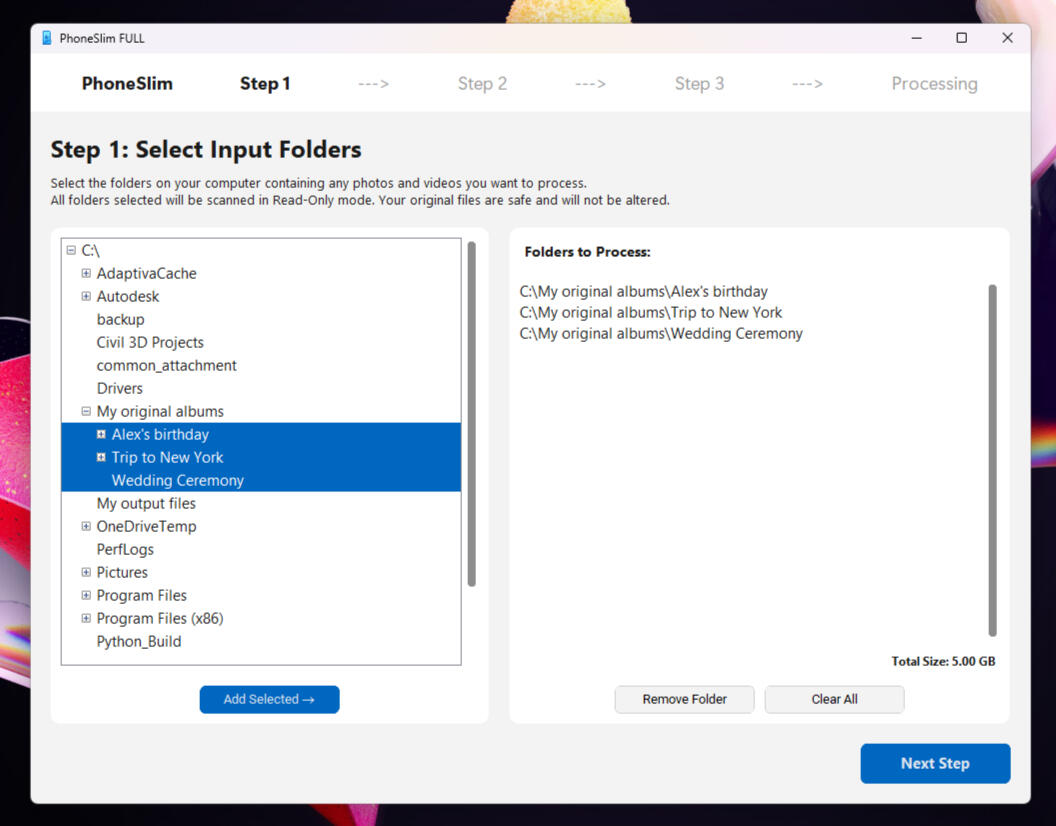
Step 1: Select Input Folders
Multiple folders can be selected and processed at the same time.
These folders can contain a mix of photos, videos, and their own subfolders.
Your original files in the input folders are completely safe and will not be altered.
PhoneSlim will scan your input folders for incompatible or duplicate files, and helpful pop-up windows will guide you through resolving them.
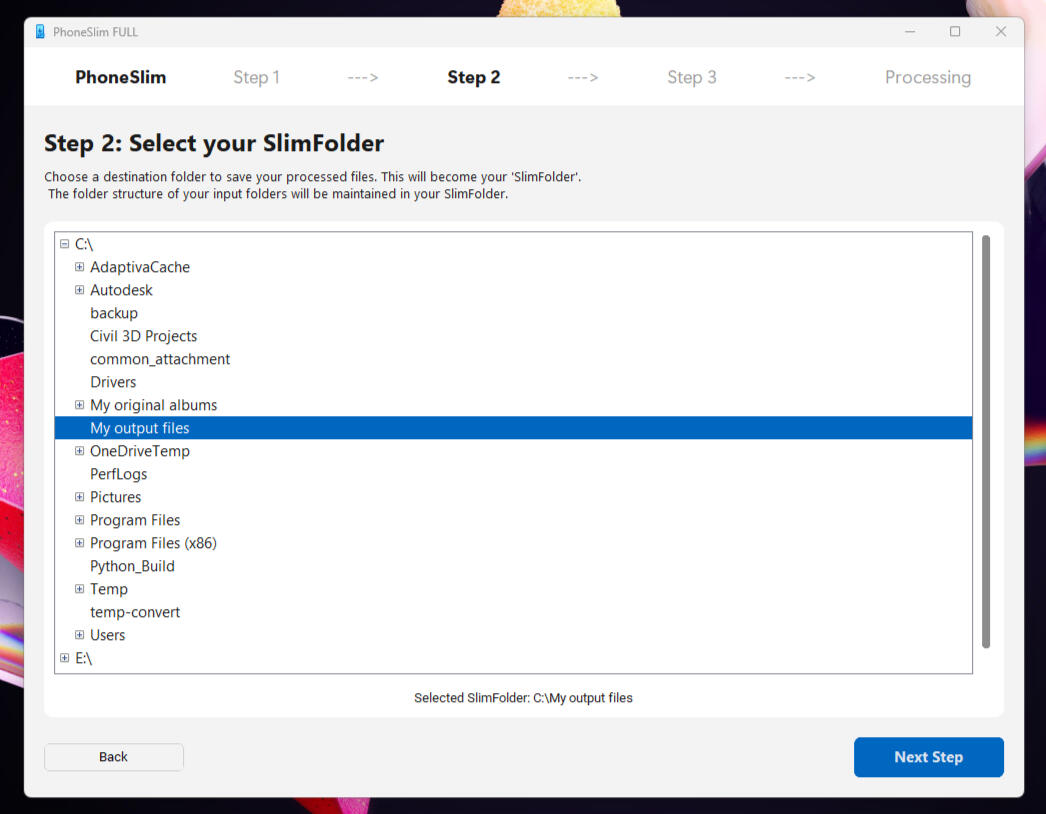
Step 2: Select your SlimFolder
Select a single destination folder where your processed files will be saved.
PhoneSlim calls this your "SlimFolder".
The folder structure of your input folders will be perfectly maintained in your SlimFolder. This ensures you will find your output files exactly where you expect them to be.
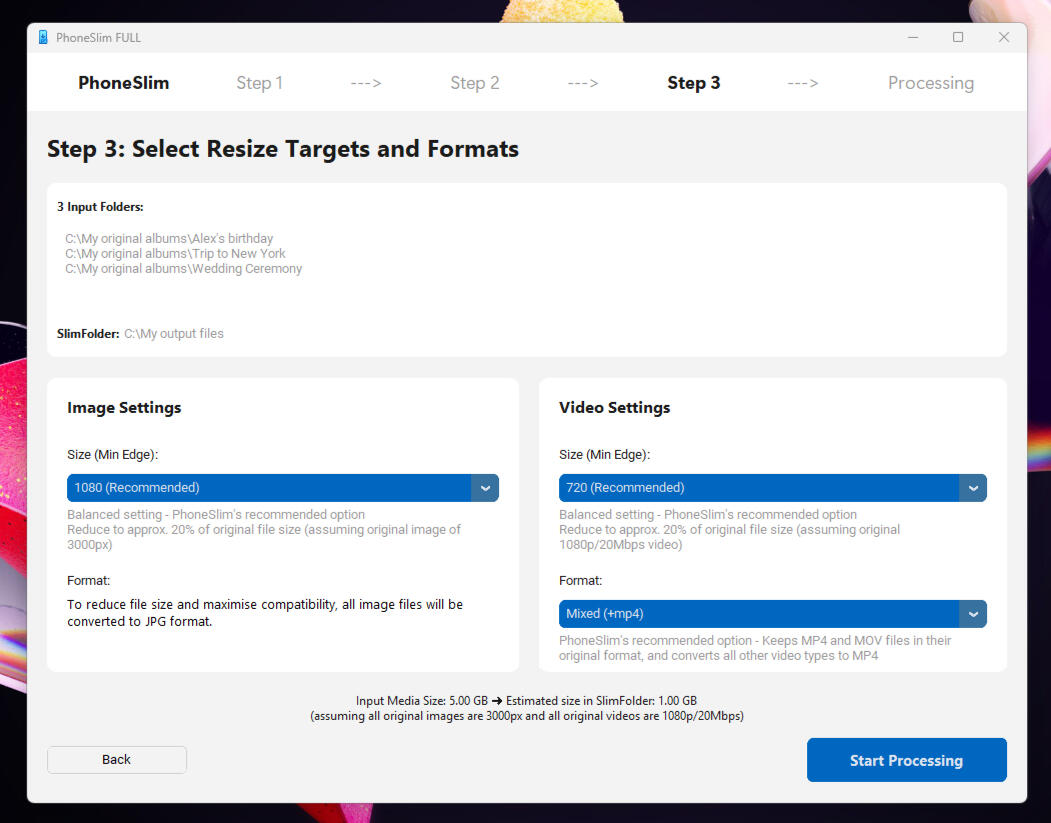
Step 3: Resize Targets and Formats
Select your preferred size for your processed photos and videos.
PhoneSlim recommends 1080px (HD+) for photos and 720p (HD) for videos for viewing on a smartphone. However, several options are available so you can choose the quality that works best for you.
All image files are converted to the universally compatible JPG format. You can set the format of your video files to either MP4 or MOV. These are standard formats fully compatible with modern smartphones, so there is no need to overthink it.
The size of your processed files is estimated at this stage. Keep in mind that this is just a rough estimate; the actual size will vary based on the original quality of your files.
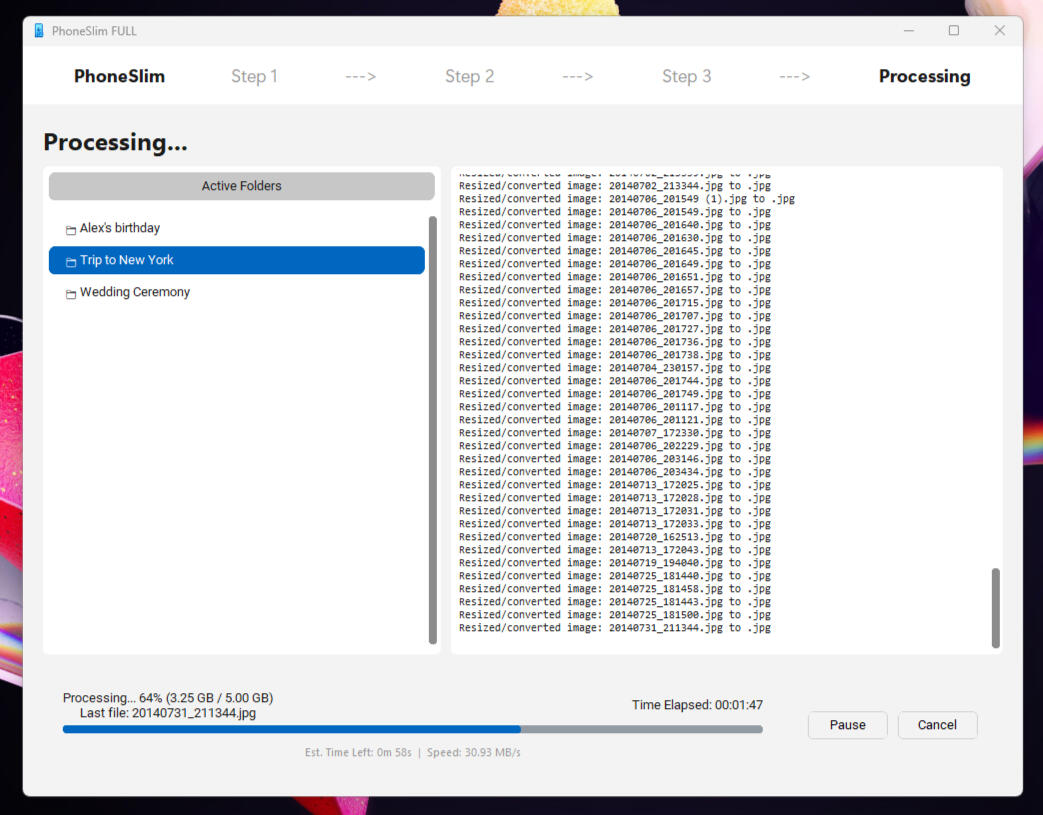
The Processing Screen
Check the progress and estimated time left at the bottom of the window.
PhoneSlim’s DateFix pop-up windows will appear to help you add missing "Create date" metadata to your files if needed. Click here to learn why some of your files may be missing a "Create date".
The total duration of the process will depend on the size of the original files you are processing and the power of your PC.
Photo and video encoding is very resource-demanding and can take several hours to complete. We recommend letting your PC run overnight so PhoneSlim can do the heavy lifting while you rest.
Do you need more details?
Get answers to Frequently Asked Questions
and learn about the external tools PhoneSlim uses
Privacy Policy | Terms & Conditions | EULA
Refund Policy
© PhoneSlim Ltd. All rights reserved.
Home | Features | The App | FAQ & Tools
Batch-processing | Contact us

FAQ & external tools
Frequently Asked Questions
External Tools
FFmpeg
FFmpeg is used to decode and encode video files. A lightweight LGPL version of FFmpeg is bundled with PhoneSlim. The native Windows 10/11 hardware encoder is utilized for video processing.
Learn more about FFmpeg and download other versions here:
https://ffmpeg.org/
Exiftool
PhoneSlim uses ExifTool to read, edit, and transfer metadata across video and image files. The advanced DateFix Auto and DateFix Manual features rely heavily on ExifTool's capabilities. Learn more about Exiftool here:
https://exiftool.org/
PhoneSlim also uses the following third-party components: customtkinter, darkdetect, packaging, pillow, certifi, charset-normalizer, idna, requests, and urllib3.
All respective licenses are included with the application and can be viewed in the installation folder.
Privacy Policy | Terms & Conditions | EULA
Refund Policy
© PhoneSlim Ltd. All rights reserved.
Home | Features | The App | FAQ & Tools
Batch-processing | Contact us

Contact PhoneSlim
We would love to hear your feedback!
Address
PhoneSlim Ltd.
128 City Road,
EC1V 2NX,
London, UK
[email protected]
Privacy Policy | Terms & Conditions | EULA
Refund Policy
© PhoneSlim Ltd. All rights reserved.
Home | Features | The App | FAQ & Tools
Batch-processing | Contact us

Privacy Policy
Privacy Policy | Terms & Conditions | EULA
Refund Policy
© PhoneSlim Ltd. All rights reserved.
Home | Features | The App | FAQ & Tools
Batch-processing | Contact us

Terms & Conditions
Privacy Policy | Terms & Conditions | EULA
Refund Policy
© PhoneSlim Ltd. All rights reserved.
Home | Features | The App | FAQ & Tools
Batch-processing | Contact us

End User License Agreement (EULA)
Privacy Policy | Terms & Conditions | EULA
Refund Policy
© PhoneSlim Ltd. All rights reserved.
Home | Features | The App | FAQ & Tools
Batch-processing | Contact us

Refund Policy
Privacy Policy | Terms & Conditions | EULA
Refund Policy
© PhoneSlim Ltd. All rights reserved.
Home | Features | The App | FAQ & Tools
Batch-processing | Contact us

Your Feedback
Takes approximately 30 seconds.
Your feedback directly shapes upcoming features.
Privacy Policy | Terms & Conditions | EULA
Refund Policy
© PhoneSlim Ltd. All rights reserved.
Home | Features | The App | FAQ & Tools
Batch-processing | Contact us

PhoneSlim v1
First official release
Safe to install and ready to use
Safe to install
No signup required
No hidden installs or bloatware
Early users may experience security warnings during installation.
Security warnings will disappear as the application gains verification and download history.
What you need to know about the v1.0.0 version
Because this is a new release, your system may show standard security notices. This is normal and safe. See below for help on some known issues.
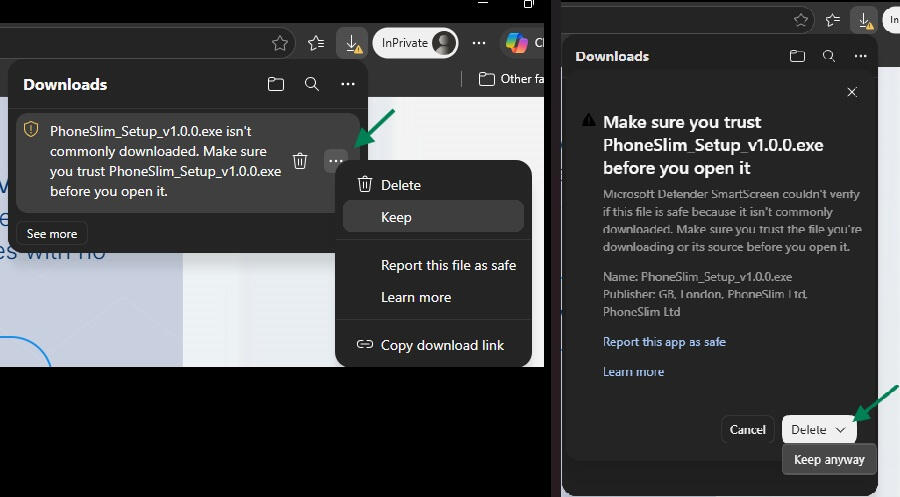
1. Microsoft Edge download warning
If you use Microsoft Edge you may receive this warning when the file downloads:
“PhoneSlim_Setup_v1.0.0.exe isn't commonly downloaded”.
This is because the app is new and doesn’t yet have a download history.
What to do:
- Hover over the download warning
- Click the three dots (⋯) on the right
- Click “Keep”
- In the next prompt, click “Keep anyway”
2. Windows security message (during installation)
When you open PhoneSlim_Setup_v1.0.0.exe to install it, Windows may display a security message. This is a standard check for new apps.
What to do:
- Click “More info”
- Then click “Run anyway”
Please press here to contact us for any other problems and get help.
Your safety matters
PhoneSlim is built using trusted, industry-standard tools and tested before every release.
No background processes or hidden activity
No data uploaded without your permission
Clean uninstall at any time
Ready to try PhoneSlim?
Privacy Policy | Terms & Conditions | EULA
Refund Policy
© PhoneSlim Ltd. All rights reserved.
Home | Features | The App | FAQ & Tools
Batch-processing | Contact us

Photo and video batch processor
Reduce the size of your photos and videos and convert them to JPG, MP4 or MOV
PhoneSlim is at its core a powerful batch processor that can be used just like other media conversion tools. Handle your files locally on your Windows PC without cloud services or monthly fees.
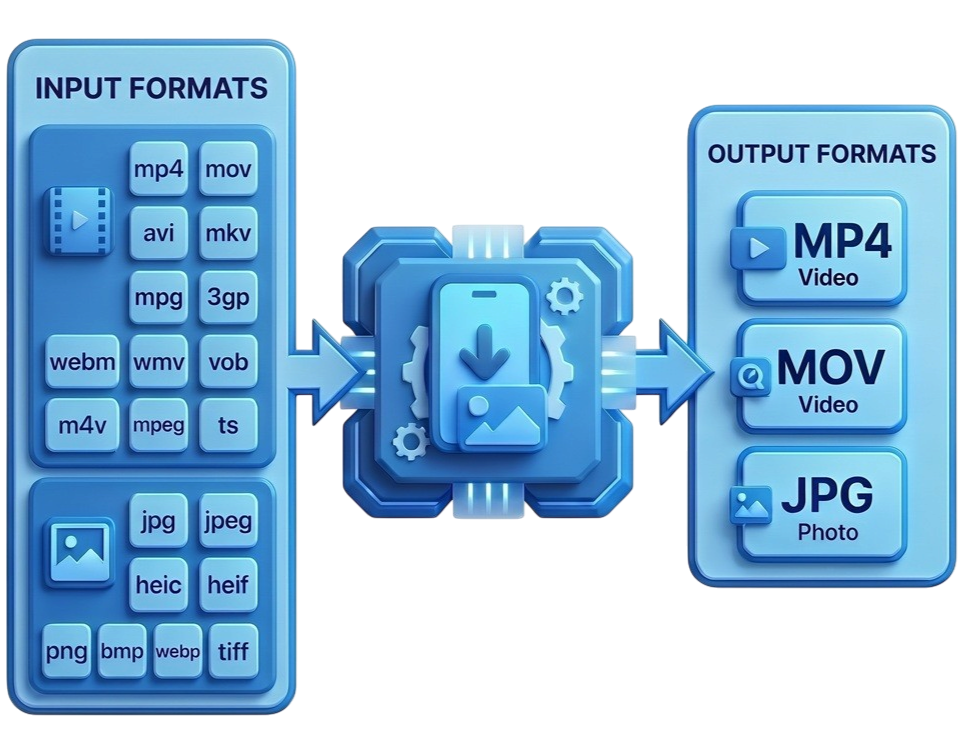
Free up to 3GB: Download and use PhoneSlim completely free for folders and files up to 3GB.
All-in-One Processing: Process entire folders of both photos and videos at the same time—no need to juggle separate tools for different file types.
Smart Resizing: Select the output quality that suits you. PhoneSlim cleverly skips resizing if your target quality is higher than the original file.
Metadata Protection: Automatically maintain and even repair your files' original metadata during conversion.
Simple, Clean Interface: Get professional batch processing results without needing to be a tech expert.
PhoneSlim is here! Grab the full version free for a limited time.
Learn more about PhoneSlim for Windows
PhoneSlim is a desktop application designed for Windows 10 and Windows 11 that can batch-process photos and videos across multiple folders at once. The interface is simple and clear - you don't have to be a tech expert to use it.
Privacy Policy | Terms & Conditions | EULA
Refund Policy
© PhoneSlim Ltd. All rights reserved.